
releases
Table of Contents
Releases
This page lists all major improvements of Attention products.
Latest Installers
Release Notes
| 26.10.2 Not yet released | ||
|---|---|---|
| AWP | ||
| New | DEV-274 The Brand Portal presents brand guidelines in AWP: brand pages with text, images with a download button, colour swatches, do's and don'ts, live sections of records and videos of records that can start by themselves, maintained as items in Fylr. Users who may edit a page edit its blocks, title, link name and place in the page tree directly in AWP, rearrange the page tree by drag and drop and create and delete pages there. A layout view of the editor arranges the blocks like the page. Each page has its own link. | |
| New | DEV-273 Text fields in the Thumbnail View can be shown on up to five lines, set per field in the view set in ACC. Line breaks of multi-line text fields are kept. | |
| Fix | DEV-272 When the actions menu of a record would contain only a single action, that action is shown as an icon next to the other record icons instead of in a menu. | |
| Fix | DEV-272 The icons in the header of the Preview View are evenly spaced for guests. | |
| Fix | Changes to a view set in ACC are shown in AWP after reloading the page, without opening a new browser tab, and the display settings of the view set no longer go missing in a tab after its session expired. | |
| Fix | After opening an AWP link, for example to a record, the browser's back button returns to the view the link opened. | |
| Fix | Reloading AWP or opening a copied AWP address keeps the search entered in the search field. | |
| Fix | After an update the browser loads the new icons of AWP, so icons added by the update are not missing. | |
| Fix | Records collected in the collection basket as guest are added to the user's collection basket after logging in. | |
| Fix | DEV-279 Records without a file show the “missing file” text in the Gallery View instead of the file extension of a record shown before them. | |
| 26.10.1 | ||
| All Products | ||
| Fix | A connection to Fylr that is closed while its session is being renewed or while it reconnects no longer keeps receiving changes in the background. | |
| ACC | ||
| Fix | “Apply” is enabled as soon as adding or updating a plugin has finished, and right after a change in a plugin dialog such as the AWP CSS editor is confirmed with OK. | |
| AMS | ||
| New | Each language of a localised text field can be exported into its own MuseumPlus field: the export field mapping offers the field once per language. | |
| AWP | ||
| New | DEV-271 The Maps View can be limited by a filter query configured in ACC: items not matching it never appear on the map. | |
| New | New customization “Blank Missing Values”: fields without a value are left blank instead of showing “-” in the Thumbnail View and Report View. | |
| New | New customization “Standard Image of Linked Object”: records without a file show the standard image of a configured linked object in all record views. | |
| New | Search engines get a record page with the record's title, description, image and fields when they follow a record link from the sitemap, so the records are found and shown with their content in search results. | |
| New | On instances with guest access a shared record link shows the record image as its preview image, also when record sharing is not enabled. | |
| Fix | A filter keeps working after it is renamed, and filter names may contain any character. | |
| Fix | Changes to the CSS and JavaScript of customizations are shown in the browser right after the customizations are installed. | |
| Fix | After an update the browser loads the new version of AWP's plugin libraries, and a library that fails to load is reported. | |
| Fix | AWP pages load faster, as the video player is only loaded when a video is shown. | |
| Fix | The Table View, Thumbnail View, Gallery View and Report View load each page faster, and the Table View loads thumbnails only when they are scrolled into view. | |
| Fix | Standard images and images of linked objects already shown are no longer loaded again on every page. | |
| Fix | Images no longer load slowly or stall once an hour while the image cache is cleaned up, and the image cache no longer stops shrinking after AWP has been running for several weeks. | |
| Fix | The sitemap is generated faster and stays available to search engines while it is being rebuilt. | |
| Fix | A settings change in ACC that arrives while AWP is being stopped or is reconnecting to Fylr no longer reloads the settings of the stopped or replaced connection. | |
| Fix | DEV-270 The Hierarchy filter expands, selects and updates its entries much faster, especially entries with many sub-entries. Clearing the filter, “Collapse all”, going back and forward in the browser and expanding a collapsed entry again no longer reload the whole hierarchy. | |
| Fix | DEV-270 Dragging an entry of the Hierarchy filter onto another entry highlights the target again, and a cancelled drag no longer leaves the entry faded. | |
| Released: 12.10.2026 | ||
| 26.10.0 | ||
| All Products | ||
| Fix | Searches for text containing a backslash now find the matching items. This also closes a security gap; updating is recommended for all installations. | |
| Fix | Access tokens and passwords are no longer written to the log files. Log files written by earlier versions may contain access tokens and should be deleted. | |
| Fix | A plugin that cannot be downloaded completely at startup no longer stays broken; it is downloaded again on the next start, and the other plugins still load. | |
| Fix | Settings that fail to save no longer write their content, including stored credentials, to the log file. | |
| Fix | Downloads whose server sends no usable file name no longer fail. | |
| Fix | The FJC event poller falls back to polling the Fylr event API after three consecutive WebSocket connection failures. Previously it stopped reconnecting without falling back, so no events (item, prefs, data model, tag and pool changes) were received until the next session token refresh. | |
| Fix | DEV-268 When the password of the user configured for the connection to Fylr is changed, the login is no longer retried every second, which filled the log and the Fylr event list. After a rejected login the next attempt is delayed, starting at one minute and doubling up to 30 minutes; a restart retries at once. An unreachable Fylr server is still reconnected to as quickly as before. | |
| ACC | ||
| New | “Remember Password” in the login dialog is replaced by “Stay Signed In”: ACC no longer stores the password but keeps the user signed in to Fylr. Passwords remembered by earlier versions are removed at the next login to that server. | |
| New | The language of ACC no longer changes with the connected server. The language in which a server's names, fields and values are shown is chosen per server in the new “Language” menu of the server node; English is the default. | |
| New | The window title shows the selected server, and the position of the divider between tree and panel is kept after a restart. | |
| New | A module that cannot be loaded is shown in the tree with the reason instead of being missing. | |
| New | Server nodes can be expanded and collapsed when more than one server is connected. | |
| Fix | Saving only writes the parts that were changed. If some changes cannot be saved, all failures are reported together, the changes stay pending and the connection is kept open. | |
| Fix | A failed connect is reported once, and the login dialog opens again with the values entered. | |
| Fix | Unexpected errors are shown with their reason; the details can be expanded and copied to the clipboard. | |
| Fix | The download link shown for an outdated ACC points to the latest ACC installer. | |
| AVP | ||
| New | A video that cannot be played - unknown, not released for streaming in Fylr or not set up in ACC - shows “This video is currently not available.” instead of an empty page or an error page. | |
| New | The number of videos streamed at the same time is limited to 100 by default, so a burst of requests cannot overload AVP and Fylr; viewers beyond the limit get a playback error and can start the video again shortly. The limit can be changed, see Parallel streams. | |
| Fix | Only the video versions enabled for the table in ACC, the preview image and the subtitles are delivered; the original file and other versions of an asset can no longer be retrieved through AVP. Changes to these settings in ACC take effect within a minute. | |
| Fix | The player only offers the video versions Fylr's deep-link user may stream, and a video the deep-link user may not see is shown as not available. | |
| Fix | Several security improvements. Updating is recommended for all AVP installations. | |
| AWE | ||
| Fix | When Run transitions as user is set, users can only apply transitions to and reassign the items they can see themselves; previously they could also change items hidden from them. If the user who triggered a transition cannot be determined, the transition is refused. | |
| Fix | In HTML notification e-mails the comment, the item title and user names are shown as plain text: markup they contain is no longer interpreted as HTML, and a comment spanning several lines keeps its line breaks. | |
| Fix | Workflow fields missing in the data model mark the Workflow Engine as changed in ACC, so “Apply” creates them. | |
| Fix | Empty rows in the assignments of an item no longer block transitions that require the user to be assigned. | |
| AWP | ||
| New | New setting Instance URL in the General panel for the public address of AWP. It replaces the URL of the sitemap option in the Services panel, an existing sitemap URL is taken over. Action required: e-mails containing a link - password reset, account validation and activation, order notifications - are only sent once the Instance URL is set. |
|
| New | The account registration and password reset forms are protected by a captcha against bots. It needs no configuration and contacts no third party. | |
| New | Behind a reverse proxy AWP uses the visitor's IP address from the proxy's X-Forwarded-For header, for the “Limit to IP addresses” options of the guest access and the Direct URL and in the log files. See Client IP behind a proxy for when to restrict the trusted proxy addresses. |
|
| New | Uploads are limited to 10 GB per request by default. The limit can be changed, see Upload size. | |
| New | Updated security response headers and session cookie defaults. Action required for instances that are embedded into another website or are also used via plain HTTP: follow the updated Security Response Headers and SameSite cookie instructions. |
|
| New | New customization “Alias Record”: clicking an alias record jumps to the hierarchy item it refers to and selects it in the hierarchy filter. | |
| Fix | Several security improvements. Updating is recommended for all AWP installations. | |
| Fix | AWP keeps responding to all users while Fylr is slow or briefly unavailable, and reconnects on its own once Fylr is back. The error page shown meanwhile no longer reloads itself endlessly. | |
| Fix | A login started under another host name than the Instance URL no longer requires logging in to Fylr twice. | |
| Fix | Tomcat shuts down promptly when AWP is stopped. | |
| Fix | Removed the unused krpano panorama viewer. 360° images are shown with the built-in panorama viewer as before. | |
| Fix | 360° videos are shown with the same panorama viewer as 360° images and can be turned by dragging and zoomed. AWP pages load faster, as the separate 360° video player is no longer loaded on every page. | |
| Fix | DEV-267 The Relations tab of the Information View opens much faster for items with many linked items. A loading indicator is shown while a tab of the Information View is loading. | |
| Fix | DEV-267 The Table View, Thumbnail View and Report View load faster for pages showing many linked items. | |
| Fix | Saving the collection basket of a large result could make AWP stop responding for all users until Tomcat was restarted. | |
| Fix | The map in the Information View no longer fails to load for items whose geographic shapes carry no names. | |
| Scheduler | ||
| Fix | The User Archiver shows the user name in an HTML notification e-mail as plain text: markup it contains is no longer interpreted as HTML. | |
| Fix | The Scheduler Docker container shuts down gracefully on docker stop. |
|
| Released: 05.10.2026 | ||
| 26.9.1 | ||
| ACC | ||
| New | Holding Shift while clicking “Update” in the Plugins panel reinstalls the selected plugins from the registry regardless of their installed version, so a plugin can be rolled back to the registry version or reinstalled at the same version. | |
| New | A connection can be given a display name via “Set Display Name…” in the context menu of its server node, next to “Set Color…”. The name is shown in the server tree as “Name (user@server)”, in the server list of the login dialog and in the “Recent” and “Reconnect” menus. Like the color it is stored on the Fylr instance, so every ACC connecting to that instance shows the same name; the login dialog and the menus of a machine know it from its first connect on. | |
| ACC, Scheduler | ||
| New | DEV-264 New Bulk Processor step “Migrate Person Names” which splits a text field holding several persons into individual records in a linked object. The value is cut into one person per comma or line break and each name into a first and a last name at a space; both parts are written into two text fields of the same linked object, which are looked up or created as needed. The nested table always ends up in the order of the source field, also when some of the persons were already linked. For names of more than two words “Name Order” decides where the name is cut, and a test area shows how the entered text is split. | |
| AFS | ||
| New | The resync now detects files whose content changed while AFS was not running and updates their items in Fylr. The number of such files is shown in the new column “Changed Assets” of the instance table. | |
| New | Files renamed or moved while AFS was not running are recognised by the resync: the existing item follows the file to its new location instead of being marked deleted and replaced by a new, empty item, so the metadata entered on it is kept. | |
| New | A file that is deleted and later restored with unchanged content - for example from the recycle bin or by a sync client - gets its original item back including all metadata, instead of a second, empty item. | |
| Fix | When the connection to Fylr is lost, the synchronization is paused and continues as soon as the connection is back. Changes in the watched folder during the outage are no longer lost and no longer have to wait for the next resync. | |
| Fix | A single change that cannot be processed no longer blocks all other changes: after about 10 minutes of retries it is skipped with an error and a resync is started right away to repair it. | |
| Fix | Renaming a file or folder so that only the letter case changes (report.pdf → Report.pdf) is handled as a rename. Previously a second item was created and the old one was never cleaned up; such leftovers are repaired by the resync. | |
| Fix | When Windows drops file system events during a very fast burst of changes - for example copying thousands of files at once - a resync is started immediately instead of at the next scheduled run, so the missed files are picked up within minutes. | |
| Fix | Deleting a folder with many files is much faster: the items are marked deleted in batches, 500 files take seconds instead of minutes. Deleted files and folders are also told apart without asking Fylr, so files moved while the connection is lost keep their item. | |
| Fix | The resync checks the watched folder for files unknown to Fylr with a single server request instead of one per file, which makes it much faster on large folders. | |
| Fix | A change that fails temporarily - for example while Fylr restarts - no longer discards what the resync has already found; its repairs are carried out as planned instead of being postponed to the next resync run. | |
| Fix | Folder changes arriving while a file is being uploaded no longer abort the upload, which could produce “HTTP request interrupted” errors and duplicate items. | |
| Fix | Moving a folder to another location - also when renaming it in the same step - keeps its items instead of marking them deleted and cataloging every file again. A folder rename interrupted by an unavailable Fylr is completed on retry without creating a second category, and renaming a folder like “Press” no longer affects “Press 2024” or “Presskit”. | |
| Fix | Replacing a cataloged file by renaming or moving another file onto its path now updates the existing item instead of leaving two items for the same file, and a new file appearing at the old path of a renamed file - as some editors do when saving - is cataloged as its own item. | |
| Fix | Fewer server requests while files are being copied into the watched folder or a folder is deleted. | |
| AVP | ||
| Fix | Videos play again in current browsers: the player no longer stalls at the poster image when starting a video, and jumping to another position within a video works. | |
| AWP | ||
| New | DEV-256 Pressing “f” in the Information View or Preview View adds the shown item to the Favorites or removes it from them, see Keyboard Support. | |
| New | DEV-259 The Quick-Search can now search Fylr's fulltext index: adding Fulltext to the Search fields matches the entered text against all fulltext-indexed content of an item, which also covers fields that are not in the search field list. It can be searched on its own as well by typing “Fulltext: term” into the search box, or “Fulltext!: term” for everything not containing it. | |
| New | DEV-260 A User Input filter can now search a file field: the entered text is matched against the file name of the asset, and with “Also search the text content of documents” also against the text Fylr extracted from the file, so a word occurring inside a PDF or Office document finds the record. | |
| New | DEV-261 A nested table in the Information View can display the standard image of each linked item in front of its name - in the single-line and multi-line text rendering as well as on the buttons - so a list of linked persons or objects shows their pictures. Enable it per field with the new option “Show Standard Image of Linked Objects” in the field properties of the View Set; entries whose linked item has no standard image are rendered as before.  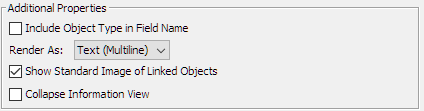 |
|
| New | DEV-263 The Collections popup shows the collections as the tree they form in Fylr: only top-level collections are listed, and a collection with sub-collections gets a +/- control to expand and collapse them. A collection whose parent is a folder or is not visible to the user appears under its nearest visible ancestor, or at the top level. Filtering by name or type keeps the tree - a matching sub-collection is shown together with its parents - and the chosen sort order is applied within each level. | |
| Fix | DEV-257 The Order System no longer demands an e-mail address in every user field when the name of the User Fields Table contains “email”: only fields whose own name contains “email” are validated as e-mail addresses. | |
| Fix | DEV-262 Changes to a View Set saved in ACC are now picked up by running AWP sessions within seconds; previously a session kept showing the view set as it was at login until the user switched view sets or logged in again. A changed default view set of the AWP instance is applied to running sessions in the same way. | |
| Fix | DEV-265 Line breaks entered in the Visual Navigation texts - the description of a tile and the long description of the selected item - are now shown as line breaks instead of being merged into one paragraph. In the Information View and the Report View Markdown spanning several lines - lists, quotes, tables and code blocks - is rendered as such instead of being broken up line by line, while line breaks and empty lines in a field value look as before. Field values in the Report View are also no longer shown as one block of preformatted text when Markdown is enabled. | |
| Released: 29.09.2026 | ||
| 26.9.0 | ||
| All Products | ||
| Fix | DEV-249 Items created through the FJC now receive the defaults configured in Fylr: the tags marked as default for their object type and pool are applied, and a file uploaded to a new item applies the import mapping configured for its pool or object type, so the fields mapped from the file metadata are filled even when the client does not name a mapping itself. Applying a metadata mapping directly after an upload no longer fails with “The file is in status processing and has currently no metadata available”: the mapping now waits for the file to be processed. | |
| ACC | ||
| New | DEV-217 New plugin Settings Backup which writes the FJC settings stored on the server - including the files they reference - into one file and restores selected parts of it, taking a snapshot of the replaced settings first. Restoring a single module into another Fylr instance is possible after an explicit confirmation, which makes it a simple way to copy an AWP instance configuration from a PROD to a TEST environment. | |
| AMS | ||
| New | DEV-237 A MuseumPlus export field mapping can now use a text field of a linked item as its source. | |
| New | DEV-241 The MuseumPlus asset export can define the master image of an object: assets matching the new “Master Query” are flagged as the master image on their linked objects. Leaving the query empty disables the feature. | |
| AWP | ||
| New | DEV-236 Tooltips showing the Mini Info View stay open as long as the mouse hovers them, so links inside them can be clicked. | |
| New | DEV-238 Download can now be disabled for items carrying a selected tag, in addition to the existing Boolean field. | |
| New | DEV-239 New customization “Hide Asset Thumbnails” which hides the asset image of every record carrying a configured tag. | |
| New | DEV-243 The language a user selects is remembered: their next login starts in the same language again. Selecting a language on the login page still wins over the remembered one. | |
| New | DEV-245 An Aggregation filter can now be sorted by “Term - Descending” in addition to “Count” and “Term - Ascending”. The chosen order is also applied when drilling into a hierarchical value. | |
| New | DEV-253 A User Input filter can now search Fylr's fulltext index: selecting “Fulltext” as the field matches the entered text against all fulltext-indexed content of a record with the “contains” and “does not contain” operators. | |
| New | DEV-254 A Hierarchy filter can show a checkbox in front of every entry, like the Pool filter does. With the new option “Show checkboxes for selecting multiple items” enabled, ticking several entries combines them into one filter without having to Ctrl-click. | |
| Fix | DEV-240 Downloading an asset no longer fails with “Insufficient rights to access resource Export” when the login happens in Fylr: the download request now carries the browser-bound session. | |
| Fix | DEV-242 A multilingual field added several times to a View Set now shows the language code in its field name, for example “Description (EN)”, so the displayed values can be told apart. | |
| Fix | DEV-243 The password reset e-mail is now sent in the language the requesting visitor is using instead of the language of the AWP administration session. | |
| Fix | DEV-248 A Direct URL image request for a record that cannot be resolved now answers with an empty “404 Not Found” instead of an internal server error. | |
| Scheduler | ||
| New | DEV-217 New job Settings Backup which writes a backup of the FJC settings into a folder on a schedule and keeps a configurable number of the newest files. | |
| New | DEV-251 The Object Linker job accepts a whole-number field as its source field; the match field can then be a number field or a text field holding the number as text. | |
| Released: 15.09.2026 | ||
| 26.8.2 | ||
| All Products | ||
| Fix | Data model changes committed by another client are picked up without a restart: cached layouts and masks are now refreshed together with the data model. | |
| ACC | ||
| New | Servers can now be removed from the “Recent” menu; the connection itself including login name and stored password stays available under “Reconnect”. | |
| ACC, Scheduler | ||
| New | New Bulk Processor step “Add / Remove Tags” which adds the selected tags to the processed records or removes them from them. | |
| New | DEV-234 The scheduler job list shows the instance a job ran on last in the new column “Last Run On”. | |
| Fix | DEV-234 Jobs that were still running when the scheduler was stopped no longer stay stuck in state “Executing”: they are reset with an error on the next start of the same instance. | |
| Fix | DEV-234 “Next Run” is now updated as soon as a job is scheduled and is cleared for disabled jobs. | |
| AWP | ||
| Fix | The AWP configuration opens faster: the anonymous user account and the configured images are loaded in the background. | |
| Released: 18.08.2026 | ||
| 26.8.1 | ||
| ACC | ||
| New | ACC supports installing Fylr plugins from registry. | |
| AWP | ||
| New | DEV-227 The order system e-mail templates can be configured for each instance individually. | |
| New | DEV-228 The password requirements hint from the base configuration is now displayed in all password settings dialogs. | |
| New | DEV-229 Duplicate Record function now available. | |
| Fix | DEV-224 Support non-IIIF nested assets in preview view. | |
| Fix | DEV-226 Fixed the wording on the Assets tab in Information View to clarify the different ways to add a new asset. | |
| Fix | DEV-230 Reenabled multiple values combination option for nested linked object filter. | |
| Fix | DEV-232 Reset Password flow now working as expected. | |
| Fix | DEV-233 Browser-bound OAuth sessions introduced with Fylr 6.34 are supported. | |
| AFS | ||
| Fix | DEV-231 Fixed truncated afs_path when the sync directory is a share or drive root. | |
| Scheduler, AVP | ||
| New | Internally restructured. | |
| Fylr | ||
| New | Plugin with custom datatype for dk5.dk dictionary added. | |
| New | Plugin which enforces a specific tag-pool mapping added. | |
| Released: 12.08.2026 | ||
| 26.8.0 | ||
| All Products ACC, AWP, Scheduler |
||
| New | Internal API cleanup. | |
| Released: 29.07.2026 | ||
| 26.7.0 | ||
| All Products ACC, AVP, Scheduler |
||
| Fix | DEV-218 Switch back to HTTP/1.1 as HTTP/2 is too unstable for heavy load or long-running applications. | |
| AWP | ||
| Fix | Fixed version numbers of AWP customizations. | |
| Released: 08.07.2026 | ||
| 26.6.1 | ||
| ACC, AWP | ||
| New | DEV-209 Added option to make health information available without session. | |
| New | DEV-213 Logout page is skipped if guest sessions are disabled. | |
| New | DEV-214 Added option to disable chunking of long text. | |
| New | Favicon supports svg image which is now the recommended favicon format. | |
| Fix | DEV-208 Fixed removal of an unsaved just created nested item in the nested table editor. | |
| Fix | DEV-216 Fixed long text chunks for l10n fields. | |
| Released: 23.06.2026 | ||
| 26.6.0 | ||
| All Products AFS, AVP, Scheduler |
||
| New | Full rewrite of the FJC library and all client modules. Always upgrade all applications and plugins when switching to this version. | |
| ACC | ||
| New | DEV-199 Added “Recent Connections” sub-menu to reopen server connection. | |
| New | DEV-200 Added button to remove server from connection history. | |
| New | DEV-201 Added option to reopen previous connections automatically on startup. | |
| Fix | Connection time is reduced by a factor of 5. | |
| AWP | ||
| New | DEV-194 Added full editing support for nested tables. | |
| New | DEV-202 Nested linked objects in bubble mode now display the Mini Info View as button tooltip. | |
| New | New customization to replace the collection basket icon. | |
| Fix | DEV-192 Maps View: Fixed endless zoom-loop if only a few items with multiple points in the GeoJSON structure exist. | |
| Fix | DEV-198 Maps View: Fixed clicking of single marker in low zoom area. | |
| Fix | DEV-196 Fixed missing suggestion results when searching with umlauts. | |
| Fix | Optimized time to first search result. | |
| Fix | Removed polyfills for old browsers no longer supported. | |
| Released: 16.06.2026 | ||
| 26.5.1 | ||
| ACC, Scheduler | ||
| New | DEV-187 Field chooser supports filtering by typing the wanted field name. | |
| New | ACC now available as MacOS package which can be found on ACC's download page | |
| AWP | ||
| New | DEV-189 Editor fully supports Geographic fields. | |
| New | DEV-188 Support webp renditions for thumbnails. | |
| New | DEV-190 Aggregation filters for Date fields now support coarse field values which are grouped in a special node next to the finer field values. Requires Fylr > 6.32. | |
| Released: 22.05.2026 | ||
| 26.5.0 | ||
| ACC, AFS, Scheduler | ||
| New | Added FJC-API support to edit tag and pool configurations. | |
| AWP | ||
| New | Updated French translation. | |
| New | DEV-182 Added option to configure initial map location. | |
| New | DEV-183 Added data- property to indicate visible infoview tab for easier css styling. | |
| Fix | Optimized screen usage for upload with pre-filler on small screen devices. | |
| Released: 05.05.2026 | ||
| 26.4.1 | ||
| ACC, Scheduler | ||
| New | DEV-181 Mapping metadata in bulk processor now supports mapping into fields of linked objects, either directly or from nested table. | |
| AWP | ||
| New | DEV-179 In Order System e-mails every user field defined can now be accessed via ${customer-data.<field-id>} for example ${customer-data.email} . |
|
| New | DEV-180 Logged in root users can access debug functions from avatar menu. 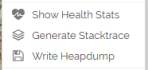 |
|
| Released: 29.04.2026 | ||
| 26.4.0 | ||
| ACC, Scheduler | ||
| New | DEV-177 Metadata Templates support additional modes “Append with space” and “Prepend with space”. | |
| AWP | ||
| New | DEV-168 Direct-URLs are now supported. This includes static links based on an item UUID but also dynamic lookups based on a configured query. | |
| New | DEV-171 Direct-URLs support CIDR-based access lists. | |
| New | DEV-172 The Share Item dialog offers the Direct-URLs including easy to use user interface to configure them as needed:  |
|
| New | DEV-175 Added option for Custom Asset Renditions to configure dpi value. | |
| New | DEV-176 Bulk Edit shows current value if it's the same for all edited items or placeholder 'Multiple Values…' indicating the differences of the selected items. | |
| New | DEV-177 Bulk Edit supports additional modes “Append with space” and “Prepend with space”. | |
| Fix | DEV-178 Editor: Filter available tags to respect pool specific tag configuration. | |
| Released: 13.04.2026 | ||
| 26.3.2 | ||
| ACC,Scheduler, AVP, AFS | ||
| Fix | Follow API change in metadata mappings. | |
| AWP | ||
| New | DEV-162 Quick-Link can be configured for a desired language. | |
| New | DEV-163 Customization: Hide Collections Management button, optionally restricted to one user. | |
| New | DEV-164 Customization: Make Collection Basket non-persistent, optionally restricted to one user. | |
| Fix | DEV-165 Always set Referrer for OSM tiles. | |
| Fix | DEV-166 Download collections no longer enforce a limit of items for the global Download All button. | |
| Released: 17.03.2026 | ||
| 26.3.1 | ||
| AWP | ||
| New | DEV-155 Video Assets show an indicator icon overlay.  |
|
| New | DEV-157 Bulk Edit now available for items in Collection Basket. | |
| New | DEV-158 All items in Collection Basket can now be deleted. | |
| New | DEV-159 New filter for pools which allows multiple pools to be selected.  |
|
| Fix | DEV-156 Editor: Fixed display of embedded notification message, for example for mandatory fields. | |
| Fix | DEV-160 Fixed display of thumbnail in Information View. | |
| Fix | Translations for sv and fi updated (Thanks Ville!) | |
| Released: 10.03.2026 | ||
| 26.3.0 | ||
| AWP | ||
| New | DEV-154 Visual Navigation: Use title and description in English or any other available language in case the current language does not provide any text. | |
| Fix | DEV-153 Fixed editor display of only empty fields below a separator. | |
| Released: 04.03.2026 | ||
| 26.2.0 | ||
| ACC,Scheduler | ||
| New | FJC library updated. | |
| AWP | ||
| New | DEV-142 Welcome Page highlight boxes now support linked objects instead if directly assigned assets. | |
| New | DEV-143 Force selection of instance to edit to avoid editing the wrong instance settings. | |
| New | DEV-146 Merged multiple quick search tooltip keys into one supporting Markdown. | |
| Fix | DEV-149 Fixed Up-To search operator for User Input Filter | |
| Released: 12.02.2026 | ||
| 26.1.0 | ||
| ACC | ||
| New | DEV-141 New Bulk-Processor module to copy all used linked objects into a sibling object type. Can be used to split a category tree into a public and private category tree in two different object types. | |
| Scheduler | ||
| New | DEV-140 Multiple Scheduler installations are now supported where each installation runs only a configured list of jobs. | |
| AWP | ||
| New | DEV-137 Information View can display special information (supporting Markdown formatting) directly below the Thumbnail  |
|
| Fix | DEV-136 Fixed linked objects rendering if the linked OT is not available to the current user. | |
| Released: 08.01.2026 | ||
Earlier releases: 2025
releases.txt · Last modified: (external edit)