
awp:filter-query
Query

| Filter Options | |
|---|---|
| Filter Name | Can be whatever you want it to be. When opening the name editor dialog one can also configure a description which is then available to users by hovering a little question mark icon which is displayed next to the filter name. |
| Filter Type | This cannot be changed. |
| Filter active | If not checked, the filter will not be used but the configuration is preserved. |
| Filter initially collapsed | If checked the filter will be expanded and the filter data initially visible. If unchecked the filter header line will only be visible. Default: unchecked. |
| Restrict filter to | Enable this option to show the filter only to the listed users or members of the listed groups. |
| Query Table | List of queries available for filtering. Each query has a display name which is visible to users and the static query-text which is executed when the query is selected by the user. |
| Combine | Specifies the way multiple selected queries are combined: AND search result should contain items where all selected queries are matched OR search result should contain items where at least one of selected queries is matched XOR allows only one query being active at a time. The first query is also auto-selected initially. To visualize this slightly different behavior, the controls change from a checkbox to radiobuttons. 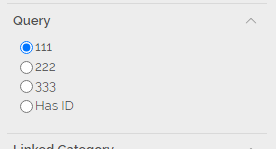 |
| Copy Reference | Copies a URL to the clipboard which can be used for a Welcome Page highlight box to enable the according query automatically when starting the AWP session by clicking that highlight box. |
awp/filter-query.txt · Last modified: (external edit)