
awp:filter-hierarchy
Hierarchy
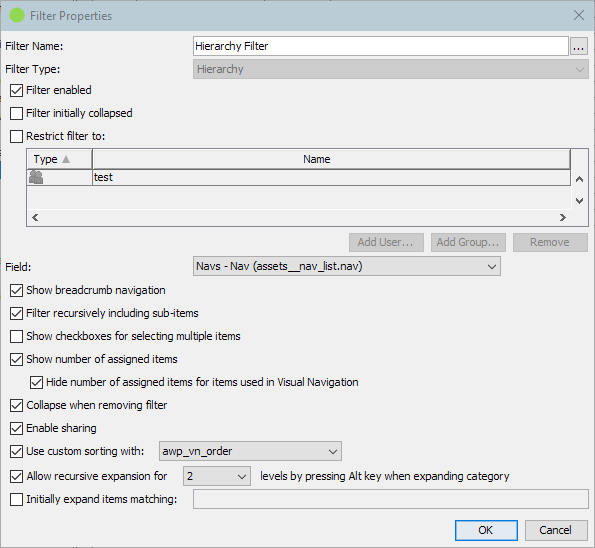
| Filter Options | ||
|---|---|---|
| Filter Name | Can be whatever you want it to be. When opening the name editor dialog one can also configure a description which is then available to users by hovering a little question mark icon which is displayed next to the filter name. | |
| Filter Type | This cannot be changed. | |
| Filter active | If not checked, the filter will not be used but the configuration is preserved. | |
| Filter initially collapsed | If checked the filter will be expanded and the filter data initially visible. If unchecked the filter header line will only be visible. Default: unchecked. |
|
| Restrict filter to | Enable this option to show the filter only to the listed users or members of the listed groups. | |
| Field | Specify the field linking a hierarchical object type to use for the filter. | |
| Show breadcrumb navigation | Embed a breadcrumb above the search result for the currently selected hierarchical item used for filtering the search result. | |
| Filter recursively including sub-items | When unchecked the filter only returns items directly assigned to the current selected hierarchical item mimicking a file-system browser. | |
| Show checkboxes for selecting multiple items | Prefixes every entry of the tree with a checkbox, like the Pool filter. Ticking several entries combines them into one filter: an item matches when it is assigned to any of the selected hierarchical items. Without this option a click replaces the selection and several entries can only be combined by holding the Ctrl key (Cmd on macOS) while clicking. Default: unchecked. |
|
| Show number of assigned items | Adds the count of items which would be found when selecting the according hierarchical item in the tree. | |
| Hide number in Visual Navigation | Count of items is not shown for the Visual Navigation hierarchy to keep it clean if used for a catalog like navigation. | |
| Collapse when removing filter | When removing the field as filter, the tree automatically collapses all expanded tree-nodes. | |
| Enable sharing | Adds a menu item for the selected hierarchical item to show a link pointing to it directly which can be shared with co-workers for example. | |
| Use custom sorting | Select the field of the hierarchical object-type that should be used to sort the tree. | |
| Allow recursive expansion | If enabled the user can expand multiple levels at once when holding the Alt key while clicking the expand icon of a tree-node. | |
| Initially expand items matching | Every hierarchical item matching the configured query will be treated as expanded when starting new sessions | |
awp/filter-hierarchy.txt · Last modified: (external edit)