
Add Items to Collection
When clicking one of the buttons to add an item or the collection basket to a collection opens this dialog:

The user can now select to add the items to an existing collection.
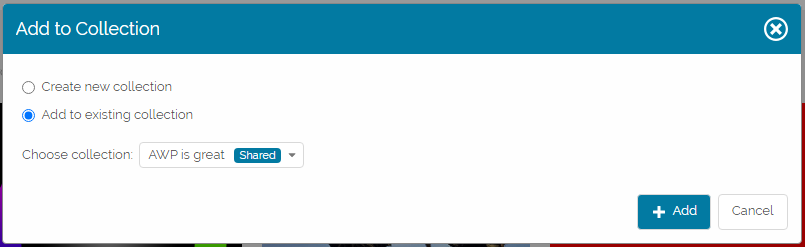
Selecting the collection to add the items to and clicking the Add button will close the dialog.
Alternatively the user can choose to create a new collection:

A new collection needs a name and can be private (only visible for the current user) or shared with individual users or with all users of a selected group.
To add a new user or role to the restriction list click the Share with element and start typing. AWP will show a type-ahead suggestion list for matching users and groups. Pressing enter or clicking one of the presented entries will add it to the list.
To stop sharing with a user or group, click the Delete icon behind the name.
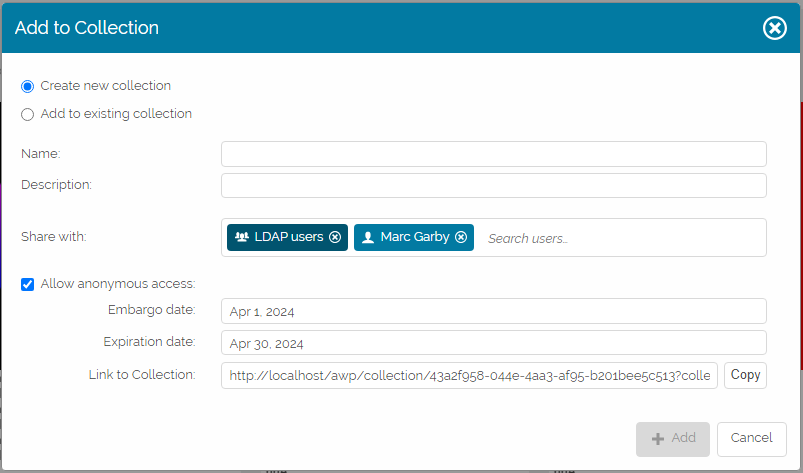
Enabling the Allow anonymous access checkbox will prepare the collection to be shared with external users without a Fylr user account. The user can define an embargo (collection not available before that date) and expiration date (collection no longer available after that date).
The Link to Collection can be copied to the clipboard and then sent to the recipients as needed. Opening such a link will not require any login as the given permissions are specified by the configured Collection Permission Preset for the Anonymous Sharing setting.