
Workflow Automation
The [AWE] Workflow Automation job handles a workflow state without a user: every item that sits in the configured state has an action run on it, and is then moved on by one transition if the action succeeded and by another if it failed. This is how a state becomes a processing step — a check, a conversion, a metadata stamp — rather than somebody's inbox. Open its configuration via the Scheduler admin module and pick [AWE] Workflow Automation as the job type.
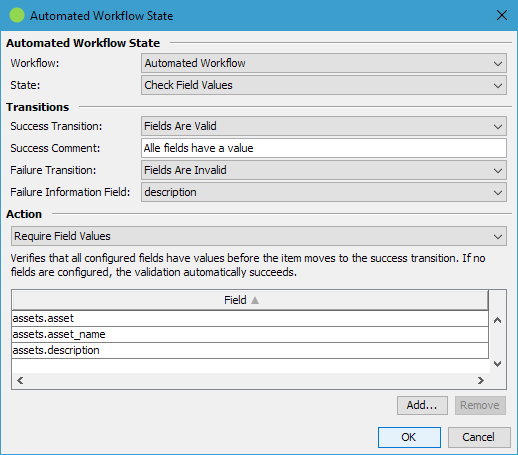
| Automated Workflow States | |
|---|---|
| A list of entries, each handling one state of one workflow. | |
| Enabled | Disabled rows are kept in the configuration but ignored at runtime. |
| Workflow | The workflow the state belongs to. |
| State | The state whose items are handled. Only states that at least one transition leaves are offered — a state nothing leads out of could not be drained. |
| Action | The action run on each item. |
| Transitions | |
|---|---|
| Success Transition | Applied when the action succeeds. The drop-down lists the transitions leaving the selected state. |
| Success Comment | The comment recorded in the history for a successful run. Required in practice — a success transition that requires a comment could otherwise never be applied by the job. |
| Failure Transition | Applied when the action fails, with the action's failure message as the history comment. Leave empty to leave failed items where they are; they are then retried on the next run. |
| Failure Information Field | A text field of the workflow's target table that receives the failure message. It describes the item's current failure, so a later success clears it again. Unlike the history entry it can be put on a mask, shown as a list column and searched for. |
| Action | |
|---|---|
| The selected action's own configuration is rendered below the choosers. An entry without an action treats every item as a success, which turns the entry into a plain “move everything on” step. |
What the job does when it runs
For every enabled entry:
- Resolves the workflow, the state and the action. Missing, disabled, unconfigured or invalid workflows, deleted states and actions that are not installed are reported and skipped.
- Looks for the items that are currently in the configured state.
- Runs the action on each item. An item whose action failed is left exactly as it was — nothing the action wrote is kept.
- On success: clears the failure information field if it holds anything and applies the success transition.
- On failure: writes the failure message into the failure information field and applies the failure transition. With no failure transition configured, only the field is written.
- Continues with the next item when one is rejected, and reports the failures at the end of the run.
Use a separate failure information field per workflow. Two entries of different workflows on the same table writing into one field overwrite each other's message; the job warns about it once per run.
Items in an automated state should normally not be reassignable — leave Items in this state may be reassigned switched off on the state, so users cannot hand work into a queue only this job drains.