
Table of Contents
Metadata Templates
Introduction
Metadata Templates work like stamps for metadata which can be applied on Fylr items. It's very flexible to configure how values should be combined with the existing metadata of an item.
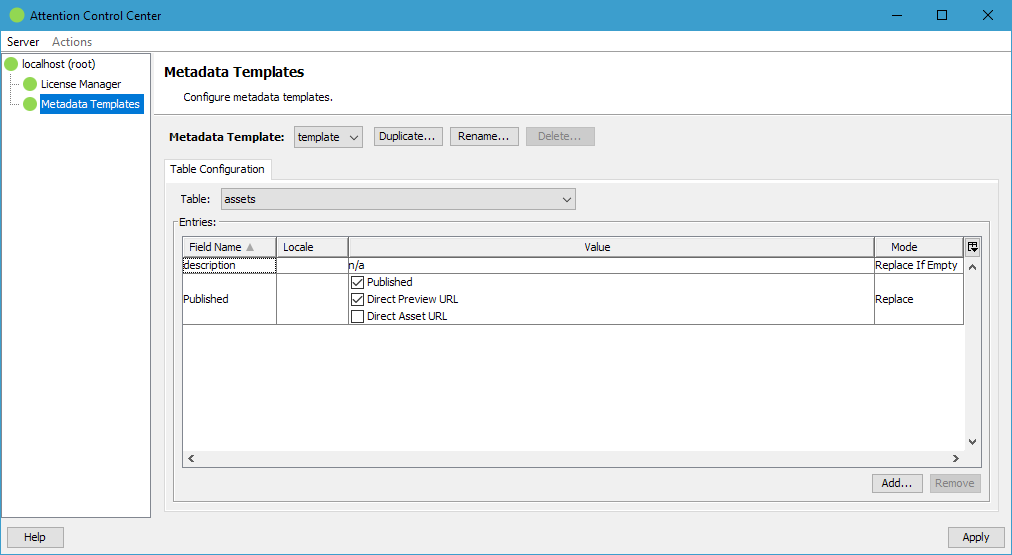
Management
The top management button bar offers buttons to create, rename and delete stored Metadata Templates.
Configuration
Start by either creating a new Metadata Template or by selecting an existing one. Next select the table you want to configure the Template for. A single Template can store configurations for multiple tables. When applying the Template only the fields of the matching table are then applied.
Below the entries table are buttons to Add and Remove entries. After adding a field the wanted field value can be configured in the Value column.
The Locale column can be used to configure the target language of the value for a multi-lingual Fylr text-field. When set to Session Language the value is written to the session locale of the user applying the Template.
The Mode column defines how the value of the field in the Template is combined with the existing value of the item:
| Clear | The field value is cleared. The value is ignored. |
| Replace | Overwrite any existing (or non-existing) value. |
Replace If Empty | Set the value only of there is no existing value. |
| Add | The selected values are added to the field values of the item. |
| Remove | The selected values are removed from the field values of the item. |
| Append | Append the new value to the existing value or set it as new value if no existing value is found. The Template does not add any additional character between existing and new value. It's up to the specification of the field value in the Template whether the value should be appended with a space or a line-break for example. |
| Prepend | Prepend the new value to the existing value or set it as new value if no existing value is found. The Template does not add any additional character between existing and new value. It's up to the specification of the field value in the Template whether the value should be prepended with a space or a line-break for example. |
Usage
The finished Metadata Template can be applied for example with the Bulk Processor or the according Scheduler Job.