
Table of Contents
Asset Actions
Introduction
The Asset Actions plugin combines several renditions of assets of different asset classes below a user-friendly label. It also support custom renditions of assets which are created on the fly.
Configuration
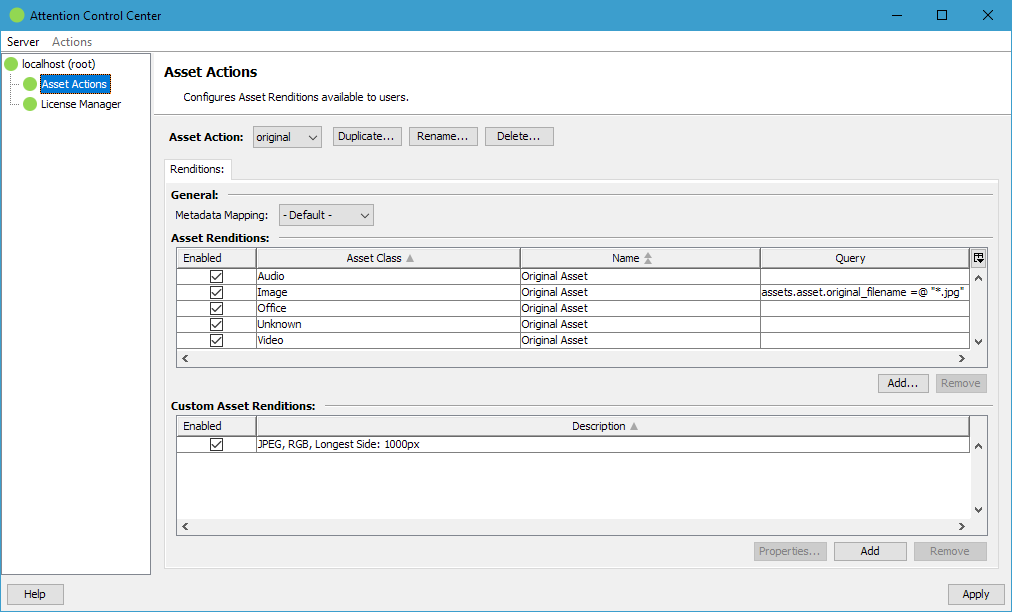
New Asset Actions can be created with the Duplicate button in the management toolbar. The Delete button removes the currently selected Asset Action. The Rename button allows renaming the currently selected Asset Action.
Each Asset Action has a Metadata Mapping configured which is used for all renditions.
The Asset Renditions table lists all renditions which should be used when executing the Asset Action. A single Asset Rendition can also be disabled to keep it in the list instead of removing it completely but ignore it in the processing. Each entry can also have an additional query assigned which disables the Asset Rendition if the item on which the Asset Action is applied does not match the query. Such queries can be built and tested with the Query Builder plugin.
The Custom Asset Renditions can be used to define formats created on the fly when applying the Asset Action. The supported feature set follows the export-to-custom-image feature of Fylr.
In addition a Custom Asset Rendition can be enabled for cropping, optionally limited to a customized aspect ratio of the crop area.
Asset Name Pattern
Each entry can also be configured to use a custom asset name pattern which can reference field values from the source item. The syntax follows the Pattern Format.