
Table of Contents
Bulk Processor
Introduction
The Bulk Processor is an administrative tool to apply changes on a search result even if it has to process tens of thousands of items or more. The Bulk Processor stores configuration in so-called Bulk Configurations which can be later reused or with a different product, for example to execute them with Scheduler at a given interval.
Management
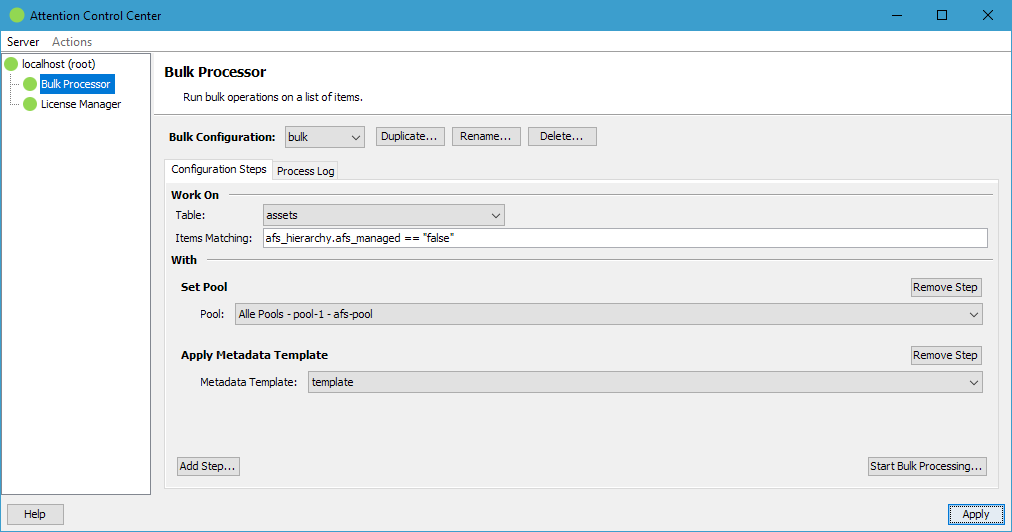
The top management button bar offers buttons to create, rename and delete stored Bulk Configurations.
Configuration
Each Bulk Configuration has to specify a table and query which configures the items to work an.
Below the query definition the steps to apply are configured. All the steps are applied in the configured order before the processed item is saved.
Execution
Clicking the Start Bulk Processing button executes the query on the table and brings up a confirmation dialog with the count of found items to make sure it matches the administrators expectations:
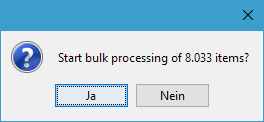
Clicking the Yes button finally starts the processing. While the processing is running the processed items are displayed on the Process Log tab.
Bulk Steps
Currently the following steps are available:
| Provider | Step | Description |
|---|---|---|
Attention Jobs | Set Pool | Set the pool the processed item should be in |
| Add / Remove Tags | Adds the selected tags to the processed item or removes them from it, depending on the chosen mode. Every tag field of the selected table offers its tags for selection. In Add mode a tag field which accepts only a single tag is set to the selected tag, replacing the one the item currently carries; a tag field which accepts multiple tags keeps the tags already set and adds the selected ones. In Remove mode only the selected tags are removed, all other tags of the item are kept. |
|
| Apply Metadata Template | Applies the configured Metadata Template on the processed item | |
| Apply Metadata Mapping | Applies the configured mapping on the processed items which copies embedded metadata of an asset into the item. | |
| Delete Item | This step supports two modes: Delete the found items of the selected table. This operation can be reverted with the Recover Deleted Items step. Purge the found items finally in case the Trash of a table is selected. Purging cannot be reversed. |
|
| Find And Replace | Search for text (optionally specified as regular expression) to replace all found matches in a text field value with another text. | |
| Inherit Field Value | Takes a field value from a linked object and writes it into a field of the linking object. | |
| Migrate Geographic | Creates a geographic field value from two fields providing latitude and longitude values. The source fields can be of type double or non-l10n text. If both are configured to the same text field, the expected value needs to be in the format 55.479349, 9.491619 to be parsed correctly. |
|
| Migrate Metadata | Extracts a value from the configured text field which is mapped into a linked object where one of the linked object's text fields matches the extracted text. | |
| Migrate Person Names | Splits a text field holding several persons into individual records in a linked object. The value is cut into one person per comma or line break, and each name into a first and a last name at a space. Both parts are written into two text fields of the same linked object; a matching linked item is reused, otherwise it is created. The nested table is brought into the order of the source field, also for persons that were already linked; rows linking a person the source does not mention are kept after them. \ Name Order decides where a name of more than two words is cut - either the first word is the first name and the rest the last name, or the last word is the last name and everything before it the first name. A single word becomes the last name. A record in which any name has more than four parts is skipped untouched, because that indicates broken source data (usually a missing separator). \ The test area shows how the entered text would be split. | |
| Recover Deleted Items | Recovers the items found in the Trash of the selected table. |
Custom Steps
The Bulk Processor defines a public FylrJavaClasses API that can be implemented by any Java developer to extend the available functions.