
awp:sharing_advanced
Advanced Sharing
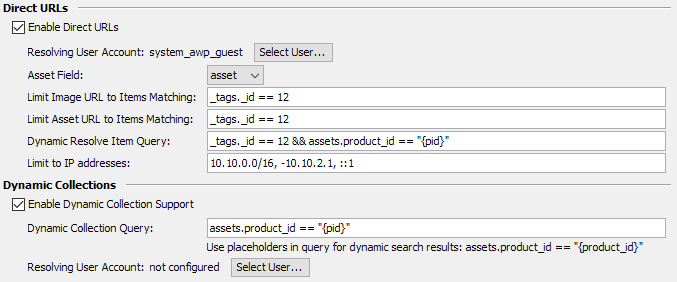
| Direct URLs | |||
|---|---|---|---|
| Direct URLs are links to images or original assets of items in Fylr. These links are resolved directly without any user AWP session. This can be used in case one wants to use an image directly on another web-page or link to a pdf file for a download for example. They use the following formats: Image with a wanted bounding box of 512px: https://awp.company.com/I/<item-uuid>?b=512 Asset which starts a download immediately: https://awp.company.com/A/<item-uuid>?a=1 |
|||
| Enable Direct URLs | Enables the feature. | ||
| Resolving User Account | Technical user used in the backend to resolve the received item UUID into an actual item. Restricting the user to a subset of renditions also limits which quality of images can be returned. | ||
| Asset Field | Specifies the File field of the main object type which should be used to deliver or to generate a preview image for. | ||
| Limit Image-URL | Additional security feature to limit the items where a Direct URL will be supported to those matching the given query. Leaving this empty enables the feature for all items the resolving user account can access. This affects only requests for an image. | ||
| Limit Asset-URL | Additional security feature to limit the items where a Direct URL will be supported to those matching the given query. Leaving this empty enables the feature for all items the resolving user account can access. This affects only requests for an asset. | ||
| Dynamic Resolve Query | Instead of resolving a specified UUID, AWP can also do a dynamic lookup based on this query. The query can use placeholders which are filled from Direct URL parameters to find the item. The example query _tags._id == 12 && assets.product_id == “{pid}” && assets.color == “{color}” has the parameters pid and color. The parameter names in the query are surrounded with {}. To get an image with this configuration the link would look similar to this: https://awp.company.com/I?pid=4213&color=blue which would result in the query _tags._id == 12 && assets.product_id == “4213” && assets.color == “blue”. The found item is not checked to match the other limiting queries as the dynamic resolve query can already filter items as needed. If more than one item is found, no image or asset is returned. Leaving this query empty disables the dynamic resolve feature. |
||
| Limit to IP addresses | Restrict the entire Direct URL feature to clients matching the configured access list. Enter a comma separated list of IP addresses or address ranges in CIDR format to limit the access to. Prefix an entry with - to explicitly forbid the access for that IP address or range. Leave empty to allow all clients. Behind a proxy this requires the client IP setup. | ||
| Dynamic Collections | |||
|---|---|---|---|
| Enable Dynamic Collection Support | Allow creation of Dynamic Collections by providing a dynamic URL like https://fylr.company.com/awp/dyn?pid=DA187456. | ||
| Dynamic Collection Query | This query uses placeholders which are filled from URL parameters to find the items to be displayed as Download collection content. The example query assets.product_id == “{pid}” has the parameter pid. The parameter names in the query are surrounded with {}. To get all items for a product id the collection link would look similar to this: https://fylr.company.com/awp/dyn?pid=DA187456 which would result in the query assets.product_id == “DA187456”. Opening this link would therefore show all items matching the generated query. |
||
| User Account | Specified the user account to log in with when opening a dynamic collection to employ restricted permissions or limited items access. | ||
awp/sharing_advanced.txt · Last modified: (external edit)