
afs:instance
Table of Contents
Configuration
The main configuration takes place in ACC. After logging in, select the File Synchronizer node on the left.
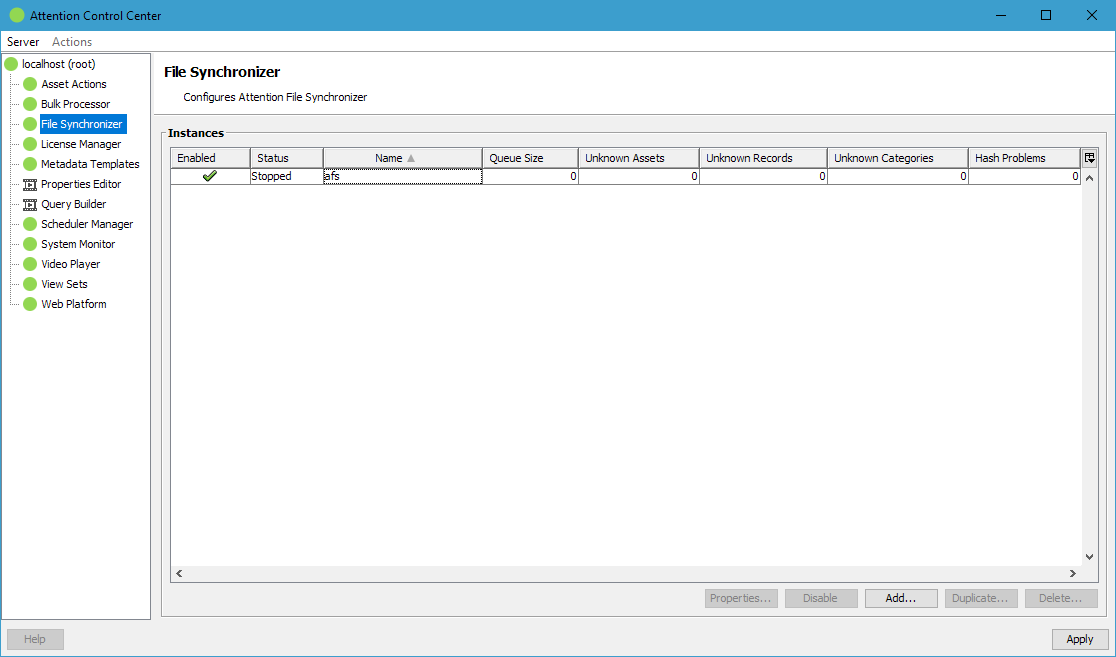
Instances
AFS supports multiple instances where each instance is monitoring one directory (including sub-directories) and synchronizes that file system hierarchy with a single object type and pool in Fylr.
Each instance has a unique name which is referenced in the AFS service application configuration file.
The table also shows additional information about the status of each instance.
| Enabled | When disabled the service application stops monitoring the filesystem. |
| Status | Reports whether the service application is currently running and waiting for events to be processed. |
| Queue Size | Number of received filesystem events which have not been processed yet. |
| Unknown Assets | Result of a resync run: Number of assets found in the filesystem which have no linked item in Fylr. |
| Unknown Records | Result of a resync run: Number of items found in Fylr where the linked asset can no longer be found in the filesystem. |
| Changed Assets | Result of a resync run: Number of assets found in the filesystem whose content differs from the asset stored in the linked item, for example because the file was edited while the AFS service was not running. |
| Unknown Categories | Result of a resync run: Number of hierarchy category items found in Fylr where the linked directory can no longer be found in the filesystem. |
| Hash Problems | Number of internal AFS hashes no longer matching the linked asset location. |
Instance Configuration
The properties for each instance offer the following options:

| Table Configuration | |
|---|---|
| Synchronize Directory | Specifies the directory to be monitored as seen from the AFS service application. Click Prepare to update the table with the needed fields. A reindex afterwards is recommended. |
| Asset Table | Specifies the table AFS should use to synchronize the assets with. |
| Pool | If the selected table is pool managed, select the pool to use for items created by AFS. |
| Asset Field | Specifies the File field of the selected table where AFS should store the assets. |
| Filesystem Table | Select the hierarchical table where AFS can store some additionally needed filesystem structure information. Click Prepare to update the table with the needed fields. A reindex afterwards is recommended. |
| Syncback Configuration | |
| Enable Syncback | Check this to enable AFS to write assets uploaded directly into Fylr also back into the file system if their item gets assigned to one of the AFS file system structure items which represent the directories. |
| Limit to items matching | Limit the syncback only for items matching this query. Without any query every item assigned to one of the file system structure items will be synced back to the file system. |
| Time-Outs | |
| Action time-out | Time between receiving the low-level filesystem event and executing the resulting operation in Fylr. |
| Time-out for resync runs | Time between full checks of Fylr and filesystem for missed assets and items. This can for example detect assets that have been created in the filesystem while the AFS service was not running. It's a heavy operation that should not run too often. |
| Time-out for resync fixes | Time between finding an issue in a resync run and fixing the underlying issue. As the resync also finds assets where the event was received by AFS but not just processed yet because the Action time-out has not passed, it's not recommended to lower this value below an hour. |
| Exclusions | |
| List of regular expressions | An asset where the asset path matches one of the listed regular expressions is ignored by AFS. The regular expression can also include parts of the path and not only the file name. |
afs/instance.txt · Last modified: by 127.0.0.1