Editor - Uploads
Introduction
Configuration of User Uploads.
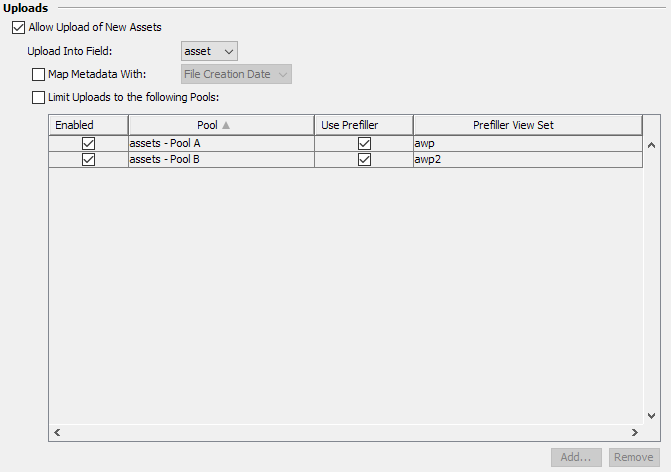
| General | |||
|---|---|---|---|
| Allow Upload of New Assets | Needs to be checked to allow users to add assets to the system. If unchecked users can still edit existing items. | ||
| Upload Into Field | Configures the destination field for new assets uploaded by users. | ||
| Map Metadata | Configures the metadata mapping applied for the uploaded asset. | ||
| Limit Uploads to the following Pools | When checked the available pools are limited to this list. In addition each pool can be configured to show an editor panel when adding new assets employing the configured view set. If unchecked all pools available to the user based on Fylr's permissions are offered. | ||
| Enabled | Pool is only available for uploads if checked. | ||
| Pool | Name of the pool. | ||
| Use Prefiller | Configured whether the user can enter some metadata for all uploaded assets when selecting this Pool by employing the configured View Set. | ||
| Prefiller View Set | Configures the View Set to use in case the Use Prefiller option is enabled for this pool. | ||