
External Tool Processor
The External Tool Processor scheduler job sends the asset on a Fylr item out to a third-party command-line tool through a pair of drop-off directories, waits for the tool to deliver a processed result, and writes that result back onto the same asset field on the item. Use it whenever a transformation has to happen in an external program that already watches a folder (re-encoders, watermarkers, OCR engines, AI processors, …). Open its configuration via the Scheduler admin module and pick External Tool Processor as the job type.
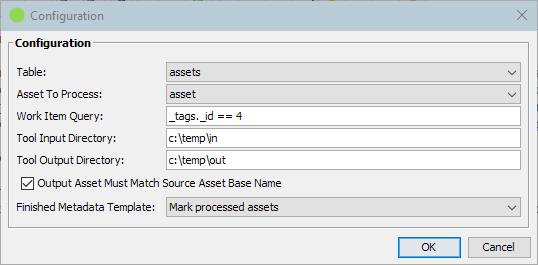
| Items To Process | |
|---|---|
| Selects the items whose asset should be sent to the external tool. | |
| Table | The Fylr table containing the items to process. |
| Asset To Process | The asset field on Table whose original rendition is sent to the external tool. The same field also receives the processed result back from the tool — the original master file is replaced. |
| Work Item Query | Fylr search query identifying the items to process on each run. Items matching this query are processed one at a time. |
| Tool | |
|---|---|
| The directories the job uses to exchange files with the external tool. | |
| Tool Input Directory | Absolute path of the directory the job writes each source asset into. The external tool must be configured to watch this directory for new files. Both directories must exist on the scheduler server when the job runs, and both must be empty before the first item is processed — otherwise the run is aborted with a warning in the scheduler log. |
| Tool Output Directory | Absolute path of the directory the job watches for the processed result. The external tool must be configured to write its output here. The job picks up the first file that appears in the directory and that is not still being written. |
| Output Asset Must Match Source Asset Base Name | When enabled (the default), the file name (without extension) of the output file must match the file name (without extension) of the source file the job wrote; otherwise the result is rejected and the item is reported as failed. Disable only when the external tool cannot preserve the base name. |
The job processes one item at a time. After every item, both directories are cleared and the job waits one second before sending the next file, so that the external tool can detect the cleanup. The job waits for the output file to appear without a built-in time limit — if the external tool fails to deliver, the scheduler thread will stay parked on that item until the run is cancelled. Make sure the external tool is healthy before scheduling this job at a tight cadence.
| Post-Processing | |
|---|---|
| Metadata template applied to every successfully processed item. | |
| Finished Metadata Template | Metadata template applied to each item after the processed file has been attached. The drop-down lists every template configured in the Metadata Templates admin module. This template is required — if it is not selected, or if the template no longer exists when the job runs, the run is skipped entirely with a warning in the scheduler log. Use the template to flip the item out of the work query (for example by clearing the flag the query selects on) so that the same item is not sent through the tool twice. |
What the job does when it runs
Every time the scheduler triggers the job it:
- Checks that the product is licensed and that the configured metadata template and both directories exist. If any of them is missing the run ends without touching an item.
- Searches the configured table with the work query.
- Skips an item whenever the input or output directory still holds files from an earlier hand-over. Assets are handed over one at a time, so a tool that stopped consuming its input makes the job idle rather than pile work up.
- Writes the item's original asset into the input directory and waits for the external tool to place a result in the output directory.
- Adds the returned file to the asset field, applies the metadata template and saves the item — but only when the result is the file the configuration expects.
- Reports an unexpected or missing result and leaves that item unchanged.