
Table of Contents
Order System
Introduction
The Order System is a collection and e-mail based solution for ordering items. Guests and logged-in users can collect the items they are interested in and send them as an order. The order is saved as a collection and also sent by e-mail to the configured recipients.
The Order System is an optional feature requiring a license. Please contact us for more details.
Workflow
The customer puts items he is interested in into the Collection Basket and clicks the Order Collection Basket button. After configuring the order and entering the needed information the order is created.
Each Order Collection configured is created as a Fylr collection which is automatically shared with the processing users. These processing users also receive an e-mail with the order information. The e-mail also contains an Order ID which can be used to quickly find the order in Fylr. Each collection is also enabled for anonymous sharing whose link could be forwarded to the ordering customer after processing the order. The according link is included in the processing user's e-mail.
The ordering user also receives an e-mail summarizing the order.
Configuration

| General | |
|---|---|
| This panel is used to configure the main settings for orders. | |
| General Settings | |
| Collection Basket Limit | Maximum number of items where orders should be possible. |
| Order Items Matching | Optional query which limits the items selected for an order. The limit is checked without the items not matching this query. |
| Show Remarks from | Configures an optional text field which contains additional information that should be displayed for an item. |
| Empty Collection Basket | The Collection Basket is emptied after creating an order successfully. |
| Require User to Agree to Terms | Some instances require the user to agree to some terms and conditions. This option enables such a checkbox. The text needs to be defined as a custom entry in each configured language. The key for that entry is awp.web.ordersystem.termsandconditions.user.agreement.1 and can also be copied to the clipboard with the Copy Localization Key link. |
| Require User to Agree to Additional Terms | In some cases a second checkbox is required, for example to force the customer to explicitly accept gdpr terms. This option also enables such a checkbox. The text needs to be defined as a custom entry in each configured language. The key for that entry is awp.web.ordersystem.termsandconditions.user.agreement.2 and can also be copied to the clipboard with the Copy Localization Key link. |
| Order Collections | |
| Each order created by the customer can be splitted into multiple Fylr collections for easier handling. Each of these entries specifies the rules for a single Fylr collection | |
| Enabled | Needs to be checked to even consider this line to be used to create a collection |
| Collection Name | This name is used to recognize and order collection more easily in Fylr's collection tree. |
| Order Collection Item Query | All items matching this query are added to the Fylr collection. If an item matches multiple queries it's also added to multiple collections. |
| Recipients | List of Fylr users which the created Fylr collection is shared with for processing and which will get an informational e-mail about the order. |
| Recipient Permissions | Permissions Preset assigned to the internal Fylr users processing the order |
| Delivery Permission | Each Fylr collection is also enabled for anonymous sharing. This option specify the Permission Preset to use for that anonymous sharing. |
| Order Products | |
|---|---|
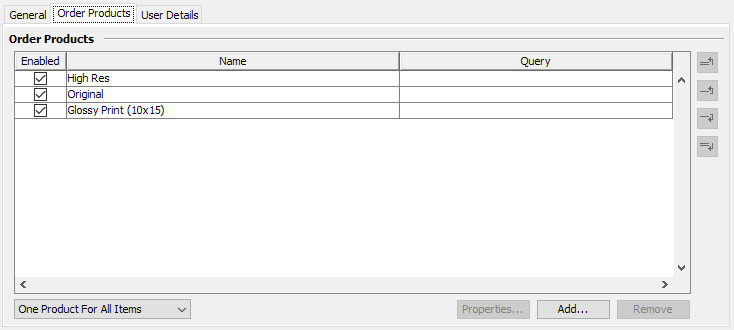
| List of products that can be ordered for an item. Products can either be Asset Actions for a download or custom text, for example representing a physical object that can be ordered. Important: The Asset Actions are only evaluated correctly if AWP itself is also used to deliver the Download Collection as Fylr has no understanding of the Order System settings |
|
| The Order System can be switched into several different order modes. | |
| One Product For All Items | Customer can only select one product from the product list for all items in the Collection Basket |
| Multiple Products For All Items | Customer can select multiple products from the product list for all items in the Collection Basket |
| One Product For Each Item | Customer can select one product from the product list for each item in the Collection Basket as needed |
| Multiple Products For Each Item | Customer can select multiple products from the product list for each item in the Collection Basket individually |
| Product Options | |
| Enabled | Needs to be checked to make this product available |
| Name | Display Name of the Product for the customer |
| Query | Limits the availability of the product to items matching the query in case the order mode is configured to be individual for each item. |
| User Details | |
|---|---|
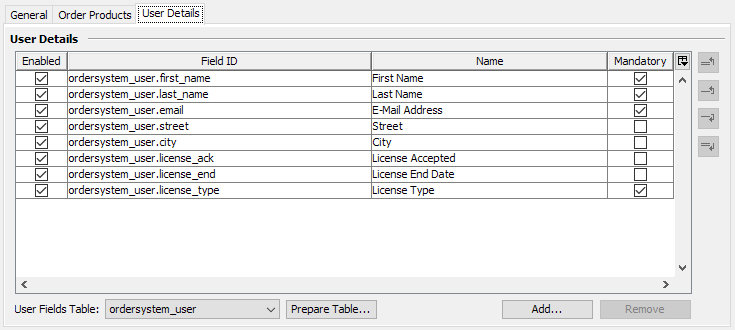
| This specifies the list of fields a customer can or has to provide to send the order. The fields to use are selected from the configured User Fields Table which can be prepared with the Prepare Table… button to include fields for the customer name and e-mail which the Order System can then recognize when sending the e-mail to the customer. Additional fields, for example for the address, need to be added manually in the data model to that User Fields Table and can then be selected here. The Order System also supports linked objects from the table to allow the customer to select from a list of available values. |
|
| Enabled | Needs to be checked to use this field in the order form |
| Field ID | ID of the field in Fylr's data model |
| Name | Display Name of the field for the administrator. The web form presented to the ordering customer uses the l10n field names configured in Fylr's data model. |
| Mandatory | When checked the customer has to provide a value before the order can be sent. |