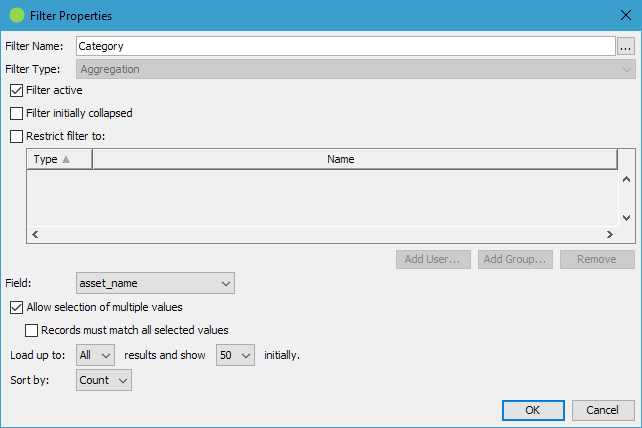
Can be whatever you want it to be. When opening the name editor dialog one can also configure a description which is then available to users by hovering a little question mark icon which is displayed next to the filter name.
Filter Type
This cannot be changed.
Filter active
If not checked, the filter will not be used but the configuration is preserved.
Filter initially collapsed
If checked the filter will be expanded and the filter data initially visible. If unchecked the filter header line will only be visible. Default: unchecked.
Restrict filter to
Enable this option to show the filter only to the listed users or members of the listed groups.
Field
Specify the field to use for the filter.
Allow selection of multiple values
If enabled, you can filter by multiple values simultaneously.
Items must match all selected values
Find items which match all selected values instead of only at least one selected value.
Load up to
Configures the number of initially loaded values or when clicking the Show More link in case more values are available.
Sort By
Configure the value order: Count: Show the most used entries first Term - Ascending: Use alphabetical sorting Term - Descending: Use reverse alphabetical sorting
awp/filter-aggregation.txt · Last modified: (external edit)