
Table of Contents
Query Builder
Introduction
Many of Attention tools rely on queries to implement dynamic features. For example a query could decide whether a certain Asset Rendition is available when applying an Asset Action. This plugin offers user-interface to build, store and test queries.
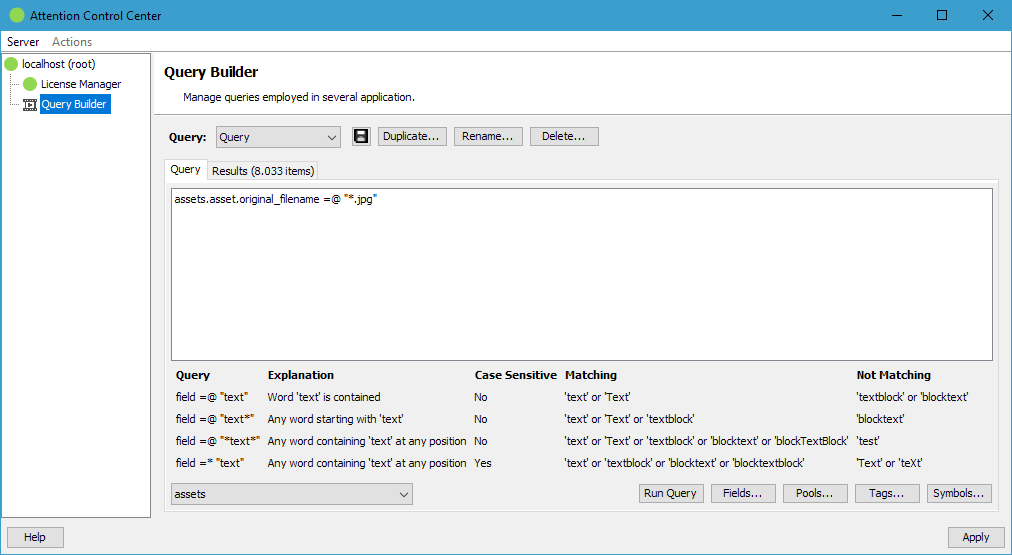
Management
The top management button bar offers buttons to create, rename and delete stored queries. It also offers a Save button next to the query name because this plugin does not save modified queries with ACC's Apply button to ensure queries are not accidentally overwritten when saving changes in other plugins of ACC.
Usage
Start by either creating a new query configuration or selecting an existing one. The Query tab offers a large editor where the actual query is entered. Below the editor a help matrix for the different ways to do a contains search in Fylr is displayed.
In the bottom left corner is the table selector located which specifies on which table of the Fylr data model the query should run. In the bottom right corner are helper buttons to select a field of the configured table, to get the IDs of selected pools or tags or to see the possible search symbols of Fylr's query language.
The Run Query button executes the query. The found items are now visible on the Results tab.
If the query works as desired, it can be added to the configuration of the target application.